
Download Encoding Converter – Browser Extensions, Chrome Extensions, IANA Character Set Support
Overview
The Encoding Converter is a lightweight browser extension designed for users who need to manage and modify web page encoding settings directly within Chrome 55 and later versions. With the default encoding feature removed from Chrome, this tool fills a critical gap by allowing users to set and override character encodings on specific webpages. It is particularly useful for professionals and researchers working with multilingual content, legacy websites, or non-standard character sets. The extension supports customization, enabling users to specify which pages should use a particular encoding, enhancing readability and data accuracy. It also offers flexibility for adding new encodings upon request, ensuring adaptability to niche or specialized needs. This makes it a valuable utility for anyone dealing with web content that displays incorrectly due to encoding mismatches. The developer did not provide additional details about the development background or organization. Real-world usage includes correcting garbled text on older websites, improving the display of international content, and supporting academic or technical research involving non-English character sets.
Key Features & Capabilities
- Custom Encoding Override – Users can manually set the default encoding for any webpage, ensuring correct text rendering when the browser fails to detect it properly.
- Per-Page Encoding Settings – The extension allows selective application of encoding rules to specific websites, avoiding unintended effects on other pages.
- Support for IANA Character Sets – Full compatibility with standardized character sets as defined by the IANA, including UTF-8, ISO-8859-1, Shift_JIS, and others.
- Request-Based Encoding Additions – If a required encoding is not included, users can submit a request via the comments section, specifying the exact IANA name, and the developer may add it in future updates.
- Lightweight Design – At just 1.2 MB, the extension has minimal impact on browser performance and resource usage.
These features enable users to resolve encoding issues that commonly arise when viewing older or poorly configured websites. For example, a researcher analyzing historical documents in Cyrillic script can use the extension to force the correct encoding, preventing misinterpretation. Similarly, a web developer testing multilingual content can quickly switch between encodings to validate display behavior. The tool is especially effective in environments where consistent character rendering is critical for data integrity and user experience.
User Interface, Workflow & Performance
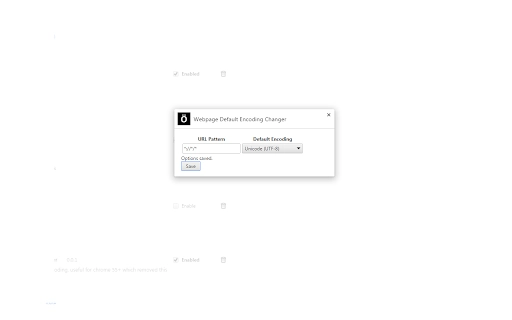
The user interface of the Encoding Converter is minimal and focused on functionality, aligning with standard Chrome extension design principles. It integrates directly into the browser’s toolbar, providing a simple icon that users can click to access settings. Navigation is straightforward, with a dropdown menu to select the desired encoding and an input field to specify the target URL. The workflow is efficient: users define the page and encoding once, and the extension applies the setting automatically on subsequent visits. No additional steps are required, making it suitable for both occasional and frequent use. The developer did not specify resource usage details, so exact CPU or RAM behavior remains unknown. However, given its small size and single-purpose function, performance is expected to be stable and non-intrusive. No reported issues with browser stability or slowdowns were mentioned. General software behavior patterns suggest it operates efficiently in the background without disrupting normal browsing.
Compatibility & System Requirements
The extension is compatible with Chrome 55 and later versions on Windows, Mac, and Linux operating systems. It is designed to function across all major desktop platforms, ensuring broad accessibility for users regardless of their preferred environment. The installation size is 1.2 MB, which is minimal for a browser extension. Exact system requirements were not listed, so users should ensure their system meets the minimum Chrome version requirement. Platform compatibility information is limited to the supported operating systems and browser version. No additional hardware or software dependencies were mentioned. The extension runs entirely within the Chrome environment, requiring no external installations or configuration beyond standard browser permissions.
Pros and Cons
Pros
- Resolves encoding issues on legacy and poorly configured websites
- Supports IANA-standard character sets for accurate text rendering
- Allows per-page encoding configuration for targeted fixes
- Free to download and use with no hidden costs
- Small file size with minimal impact on browser performance
Cons
- No official documentation or user guide provided
- Encoding additions require user requests and may take time to implement
- Limited to Chrome browser; not available for other browsers
- UI lacks advanced customization options or visual feedback
- No built-in update notifications or automatic version checks
FAQ Section
Is the Encoding Converter compatible with Chrome 55 and above?
Yes, the extension is designed specifically for Chrome 55 and later versions, ensuring compatibility with modern browser standards.
Can I add a custom encoding not listed in the extension?
Yes, if a required encoding is not included, users can request it by submitting a note in the comments section, specifying the exact IANA character set name.
Is the extension safe to use?
As a Chrome extension, it operates within the browser’s security sandbox. It only accesses webpage content when explicitly requested and does not collect personal data. Users should install it from official sources to ensure authenticity.
Does the extension work on all operating systems?
Yes, it is compatible with Windows, Mac, and Linux, as long as the system supports Chrome 55 or later.
Can I use the extension offline?
Yes, once installed, the extension functions without an internet connection. However, adding new encodings requires a request submitted online via the comments section.
Final Thoughts
The Encoding Converter is a focused, practical solution for users encountering encoding problems in Chrome. Its ability to override default encoding on specific pages makes it indispensable for researchers, developers, and anyone working with multilingual or legacy web content. Despite minor limitations such as the lack of documentation and limited browser support, its core functionality is reliable and effective. The free model and lightweight design enhance its appeal. For those needing precise control over character rendering, this extension delivers value without complexity. Download Encoding Converter now.







